Feedback
Game Name
Share









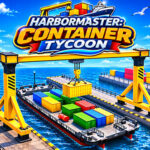
Harbor Master Container Tycoon
Harbor Master Container Tycoon
# HARBORMASTER: CONTAINER TYCOON Welcome to HarborMaster: Container Tycoon! Take control of a busy cargo port and become the ultimate harbor master. Operate powerful port machinery, load and unload cargo ships, transport shipping containers, manage your container yard, and complete challenging logistics missions. Master realistic container handling, drive heavy industrial vehicles, upgrade your port facilities, and expand your harbor into a massive shipping empire. ### Key Features - Realistic 3D Port Environment - Multiple Heavy Industrial Vehicles - Container Loading & Unloading - Cargo Ship Management Challenging Port Missions
How to Play
W Move Forward S Move Backward A Steer Left D Steer Right Space Brake E Enter Exit Vehicle Q Attach Detach Container R Raise Container F Lower Container C Change Camera Shift Accelerate Mouse Camera Rotation Esc Pause Game
DONT SPLASH Game Guide · How to Play Garage Tycoon 3D · Hop Hero: A Lollipop Adventure Game Guide · Hero Monster Battle Game Strategy Guide · Popular H5 Game · High Score Tips · Game Recommendation · Free Online Game · High Score Tips · High Score Tips · Walkthrough Tips · Try this similar game · Stuck? Check this out · Want more? Keep playing · Too easy? Level up
Black Hole Swallow Master Game Guide · Tug Pull Crash Challenge Strategy Guide · How to Play Super Car Wash 3D · Relaxing Mini Fun Games Game Guide · Advanced Guide · Beginner's Guide · High Score Tips · Free Online Game · Advanced Guide · Beginner's Guide · High Score Tips · Want more? Keep playing · Stuck? Check this out · Want more? Keep playing · Want more? Keep playing
Play Harbor Master Container Tycoon for free in your browser — no download required.
Game Controls
W Move Forward S Move Backward A Steer Left D Steer Right Space Brake E Enter Exit Vehicle Q Attach Detach Container R Raise Container F Lower Container C Change Camera Shift Accelerate Mouse Camera Rotation Esc Pause Game
You May Also Like





Gaming Terms to Know
- Frame Rate
- Measured in FPS (frames per second), this determines how smoothly the game animates. 60 FPS is ideal; 30 FPS is acceptable for slower-paced games.
- Leaderboard
- An online ranking of top scores or fastest times. Competing for a spot on the leaderboard adds replay value long after completing the main content.
- Achievement
- An optional in-game milestone (complete a level without dying, find a secret area) tracked across your profile. Achievements add extra challenges for completionists.
- Checkpoint
- A save point within a level that you respawn at when defeated. Collecting checkpoints prevents losing all progress on death.
 3d
 Action
 Adventure
 App Store
 Arcade
 Blog
 Boys
 Brain
 Car
 Car Racing
 Casual
 Classic
 Clicker
 Color
 Cooking
 Cool
 Cozy
 Crazy
 Flash
 Funny
 Games For Boys
 Games For Girls
 Girls
 Gun
 Html5
 Hypercasual
 Intelligence
 Logic
 Mini
 Mobile
 Multiplayer
 New
 Pais De Los Juegos
 Platform
 Point And Click
 Pop It
 Popular
 Puzzle
 Puzzles
 Racing
 Robot
 Rpg
 Shooting
 Skill
 Soccer
 SportsStickman
 Synthesis
 Video
About Harbor Master Container Tycoon
# HARBORMASTER: CONTAINER TYCOON Welcome to HarborMaster: Container Tycoon! Take control of a busy cargo port and become the ultimate harbor master. Operate powerful port machinery, load and unload cargo ships, transport shipping containers, manage your container yard, and complete challenging logistics missions. Master realistic container handling, drive heavy industrial vehicles, upgrade your port facilities, and expand your harbor into a massive shipping empire. ### Key Features - Realistic 3D Port Environment - Multiple Heavy Industrial Vehicles - Container Loading & Unloading - Cargo Ship Management Challenging Port Missions
How to Play
W Move Forward S Move Backward A Steer Left D Steer Right Space Brake E Enter Exit Vehicle Q Attach Detach Container R Raise Container F Lower Container C Change Camera Shift Accelerate Mouse Camera Rotation Esc Pause Game
Game Features
- Genre: 3d
- Free to play — no downloads, no logins
- Works on desktop, mobile, and tablet browsers
- Instant play — click and start
Related Articles
- Binary Collapse: Why the 3D Games vs Binary Divide is a Taxonomic Error Binary Collapse: Why the 3D Games vs Binary Divide is a Taxonomic Error The persistent classification of video games int…
- Arcade Excellence: Five Proven Tips for Mastering Gangster V and Void Drop 3D Arcade Excellence: Five Proven Tips for Mastering Gangster V and Void Drop 3D The arcade genre demands precision, rapid …
- Action vs 3D: Designing for Different Player Psychologies Action vs 3D: Designing for Different Player Psychologies The landscape of interactive entertainment is split into two d…
- Action vs 3D Games: Rapid 3D Awareness Meets Precision Aim Action vs 3D Games: A Comparative Analysis The landscape of online gaming presents two distinct pillars that cater to va…
Similar Games You May Like









Please turn the screen 90 degrees to enjoy a better gaming experience!