

Feedback
Game Name
Share










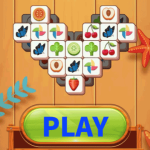
Tile Master
Tile Master
Game introduction:
Tile Master is a free online game for eliminating the same pattern. It is a small, beautiful, high-quality game that can be played directly without downloading and installing. This game belongs to "MATCH 3 GAMES" and "MATCHING GAMES". It is a classic casual game that is more popular for men and women. The fruit animations in this game are realistic and very easy to identify. You can pass the level by eliminating them within a limited time. The difficulty of the game levels increases step by step, and the time will become shorter and shorter.
Only by passing the current level can you unlock the next level. There are endless levels waiting for you to challenge. Tile Master is a vertical screen game experience, hoping to bring you immersive happiness.
Game Tips:
1. The click speed must be fast, because there is a time limit. The higher the level, the faster the time. The faster you eliminate, the more time you can gain. 2. Find the pattern above first. After eliminating it, the pattern below will be unlocked, and you can pass the level faster. 3.
If you can't eliminate it, use props immediately to help you pass the level. 4. After passing the level, there is a treasure chest reward. You can draw game props and stockpile them, which will make it easier for you to pass levels.
- From Tile Master to Crazy Knife: Level Up Your Game
- Finished Tile Master? Try Pocket drift
- Finished Tile Master? Try Super Asian Cup
- Finished Tile Master? Try Crazy Marker
- From Tile Master to Block Gun 3D: Level Up Your Game
- From Tile Master to My Unicorn: Level Up Your Game
- From Tile Master to Blast Star: Level Up Your Game
- If you enjoyTile Master,also enjoyFlag Football Game — try it here
- From Tile Master to Sniper Assassin: Level Up Your Game
- Finished Tile Master? Try Piano Music Master
- From Tile Master to Head FootBall 3D: Level Up Your Game
- From Tile Master to Football Puzzle Goal: Level Up Your Game
- From Tile Master to Speen: Level Up Your Game
- Finished Tile Master? Try Bike Racing 3
- Finished Tile Master? Try Alien Shooter
- From Tile Master to Crazy Kart 3D: Level Up Your Game
- Finished Tile Master? Try Street Racing
- If you enjoyTile Master,also enjoy2048fall — try it here
- If you enjoy Tile Master, you will also enjoy Dream Football Game — try it here
- Minecraft Pixel Gun Shooter
- Played enough? Try Hatchling Heroes Arena
- Played enough? Try Evolution Arena Battle Royale
- If you enjoy Tile Master, you will also enjoy Brave Archer — try it here
- If you enjoy Tile Master, you will also enjoy Racing Battle — try it here
- If you enjoy Tile Master, you will also enjoy Pinball Legends — try it here
- Amazing Road
- Played enough? Try Truck Browser Games in 2026: A Reality Check
- If you enjoy Tile Master, you will also enjoy Why Most Battle Game Advice Is Wrong — try it here
- Played enough? Try Monster Truck Extreme Stunts
- Played enough? Try Bicycle Stunt Racing Game 3D
- The Illusion of Depth: Why Casual Rankings Fail and Where We
- Finished Tile Master? Try Stickman Warriors Superhero Fight
# Tile Master Guide
Getting Started
Tile Master is a fast-paced strategy game where the objective is to create the highest-scoring valid tile layout within a limited number of moves. The game board starts empty, and you must place tiles one by one to form continuous chains or complete sets. Your score is calculated based on the length of contiguous tile groups and special bonus tiles scattered across the board.
The core goal is to maximize your score before the move counter reaches zero. Unlike some puzzle games that penalize bad moves, Tile Master rewards aggressive play—if you place a tile that blocks your own future options, it may actually force the game to end sooner, but if the resulting layout is high-scoring, you could still win. Always evaluate both the immediate score gain and the long-term connectivity of your moves.
Pro Tips
Mastering Tile Master comes down to planning ahead. One of the most effective strategies is to prioritize placing tiles that connect existing chains rather than isolating them. Look for opportunities to complete a set of three or four identical tiles in a row or column; these often trigger massive point boosts.
Another advanced trick is to deliberately sacrifice a low-scoring placement to set up a high-value chain in the next turn. For example, placing a single tile that blocks a corner might seem like a mistake, but if it allows you to form a five-tile row on your next move, the trade-off is worth it. Always keep an eye on the special bonus tiles—they can turn a mediocre board into a high-scoring one if positioned correctly.
Timing matters too. As your move count dwindles, switch from aggressive expansion to defensive consolidation. Focus on extending existing chains rather than starting new ones, since each additional tile on a chain yields diminishing returns once it reaches five or six tiles. Use the final few moves to tuck in any remaining isolated tiles into the best available spots.
Controls
Tile Master supports both keyboard and mouse inputs for flexible play.
- Mouse: Click anywhere on the board to place the currently selected tile at that position. Hovering over a tile shows its value and any special effects. - Keyboard: Use the arrow keys to navigate the tile selection menu (if available) or to move the cursor on the board for precise placement. Press Enter to confirm a placement, or Escape to cancel the current selection. - Undo: Press Ctrl + Z at any time to undo your last move. This is incredibly useful during the final turns when you need to experiment with different placements without losing progress.
- Pause/Resume: Press P to pause the game clock and review your board. Press it again to resume. - Reset: If you make a mistake early on, press R to reset the board to its initial state, losing all progress but giving you a fresh start.
These controls are fully mapped and accessible throughout the game, allowing
FAQ
Q: How do I control the tiles?
A: You can use your mouse to drag tiles and your keyboard arrow keys to move them. Press the spacebar to rotate a selected tile. If you find the controls difficult on a mobile device, try enabling the "One-Handed Mode" in the settings, which simplifies navigation and makes gameplay much easier.Q: Is there a way to save my progress?
A: Yes, your progress is automatically saved as you play, so you won't lose anything if you close the app. However, you can also manually save at any time by tapping the floppy disk icon in the top-right corner. This feature is available on both PC and mobile platforms.Q: What is the best strategy for difficult levels?
A: The hardest levels often require patience. Try to keep a balanced mix of colors and shapes on your board to create more opportunities for matches. If you run into a tough spot, using a Power-Up can be very helpful; they are earned through gameplay and can clear blocks or swap tiles. Remember that each move is valuable, so plan ahead.Q: How do I unlock new content?
A: New levels, colors, and special characters are unlocked by reaching specific score milestones. Once you hit the required points, the new content becomes available immediately. There is no need to restart the game; simply continue playing and watch for the unlock notifications.Q: Are there any tips for beginners?
A: Start by focusing on forming small matches (two or three tiles) rather than aiming for massive combos right away. Large matches consume more moves and can leave you stranded. Also, always try to keep your board relatively full; empty spaces can sometimes prevent you from completing a match.Q: What games are similar to Tile Master?
A: If you enjoy Tile Master, you might also like "Color Splash," "Block Puzzle," or "Jewel Match." These titles share similar matching mechanics but offer different themes and power-ups. They are all highly rated and make great alternatives if you are looking for a new puzzle experience.👉 If you enjoy Tile Master, you will also enjoy Stickman Restaurant Rush Game — try it here
👉 If you like Tile Master, Funny Volleyball is a natural next pick
👉 Played enough? Try Why the Casual vs. Puzzle Binary Fails
- If you enjoy Tile Master, you will also enjoy Dracula run — try it here
- Truck Browser Games in 2026: A Reality Check
- The Myth of Fairness in Superhero Rankings
- If you enjoy Tile Master, you will also enjoy The Illusion of Fairness: Why Ball Game Rankings Deceive Players — try it here
- The Myth of Ranking Superiority in Superhero Browser Games
- Bicycle Game Rankings: A Dishonest System in Need of Reform
- Reconstructing Fairness: Racing Games After the Crash
- Played enough? Try The Myth of the Solo 2-Player Ranking
- The Myth of the Egg: Why Rankings Fail and What Comes Next
- If you enjoy Tile Master, you will also enjoy The Illusion of High Scores in Browser Fish Games — try it here
👉 If you enjoy Tile Master, you will also enjoy Museum Night Shift — try it here
👉 Played enough? Try Scale the Depths
👉 If you like Tile Master, Tidy Bot is a natural next pick
Frequently Asked Questions
Do I need to download anything to play Tile Master?
No, Tile Master is a free HTML5 game that plays instantly in your browser without any downloads or installations.
Can I play Tile Master on my mobile phone?
Yes, the game works on both mobile and desktop devices, so you can play it directly on your phone.
Do I have to create an account to start playing?
No signup is required; you can launch the game immediately and start eliminating matching patterns right away.
You May Also Like




Gaming Terms to Know
- Browser Game
- A game that runs entirely in your web browser — no downloads, no installations. Just click and play. Uses HTML5, JavaScript, and WebGL.
- Frame Rate
- Measured in FPS (frames per second), this determines how smoothly the game animates. 60 FPS is ideal; 30 FPS is acceptable for slower-paced games.
- Leaderboard
- An online ranking of top scores or fastest times. Competing for a spot on the leaderboard adds replay value long after completing the main content.
- Achievement
- An optional in-game milestone (complete a level without dying, find a secret area) tracked across your profile. Achievements add extra challenges for completionists.
 3d
3d Action
 Adventure
 App Store
 Arcade
 Blog
Blog Brain
Brain Car
Car Car Racing
 Casual
 Classic
 Clicker
 Color
Color Cooking
 Cool
Cool Cozy
Cozy Crazy
Crazy Flash
Flash Funny
Funny Games For Boys
 Games For Girls
 Girls
Girls Gun
Gun Html5
Html5 Hypercasual
 Intelligence
 Logic
Logic Mini
Mini Mobile
 Multiplayer
 New
New Pais De Los Juegos
 Platform
 Point And Click
 Pop It
 Popular
 Puzzle
 Puzzles
 Racing
 Robot
Robot Rpg
Rpg Shooting
 Skill
Skill Soccer
 Sports
 Synthesis
 Video
VideoAbout Tile Master
Game introduction: Tile Master is a free online game for eliminating the same pattern. It is a small, beautiful, high-quality game that can be played directly without downloading and installing. This game belongs to "MATCH 3 GAMES" and "MATCHING GAMES". It is a classic casual game that is more popular for men and women. The fruit animations in this game are realistic and very easy to identify. You can pass the level by eliminating them within a limited time. The difficulty of the game levels increases step by step, and the time will become shorter and shorter. Only by passing the current level can you unlock the next level. There are endless levels waiting for you to challenge. Tile Master is a vertical screen game experience, hoping to bring you immersive happiness. Game Tips: 1. The click speed must be fast, because there is a time limit. The higher the level, the faster the time. The faster you eliminate, the more time you can gain. 2. Find the pattern above first. After eliminating it, the pattern below will be unlocked, and you can pass the level faster. 3. If you can't eliminate it, use props immediately to help you pass the level. 4. After passing the level, there is a treasure chest reward. You can draw game props and stockpile them, which will make it easier for you to pass levels.
How to Play
Click or tap the play button to start. Use your mouse, keyboard, or touchscreen to control the game. The objective is simple — dive in and start having fun! No downloads or installations required.
Game Features
- Genre: Casual, Classic, Games For Girls, Match 3, Matching
- Free to play — no downloads, no logins
- Works on desktop, mobile, and tablet browsers
- Instant play — click and start
Related Articles
- Casual Games 2026: Top Picks vs Common Advice Why Most Casual Game Advice Is Wrong: A Data-Driven Deconstruction The casual gaming industry is often saturated with ad…
- Casual Games Difficulty Guide: Beyond the Rankings The Illusion of Depth: Why Casual Rankings Fail and Where We Go Next The current ecosystem of casual browser gaming suff…
- Top Casual Games to Play Online in 2026 The Illusion of Fairness in Casual Game Rankings In the late 2020s, casual gaming has become a multi-billion dollar indu…
- Casual Games vs. Action: A Developer's Design Guide The False Dichotomy: Why Casual and Action Are Merely Design Choices Indie developers often frame their projects as exis…
Similar Games You May Like










Please turn the screen 90 degrees to enjoy a better gaming experience!
