

Feedback
Game Name
Share







Match Picture To Words 3D
Match Picture To Words 3D
The Hook
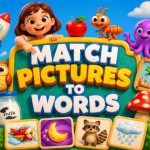
Match Picture To Words 3D is a solid brain-teaser that keeps you thinking without feeling like homework. The concept is straightforward: you get an image and a set of letters, and your job is to build the right word(s) that describe what you see. The 3D aspect usually means the pieces are rendered with depth, so you can rotate or zoom slightly to inspect details before you type. It’s perfect for a quick puzzle break—maybe while waiting for a meeting or on a commute. The interface is clean, the typing area is responsive, and there’s no pressure to rush, though the timer does add a nice little edge.
Is It Worth Playing?
If you like word puzzles with a visual twist, this game fits the bill. It’s free and runs smoothly in any browser, so you don’t need to install anything. The difficulty scales as you progress, so early levels feel like a warm-up, while later ones demand sharper observation. The scoring system rewards both speed and accuracy, which keeps the replay value up. My only complaint is that the hint system sometimes feels a bit generic, but that’s a minor gripe for a game that’s otherwise tight and fun.
- Finished Match Picture To Words 3D? Try Football Marble Shooter
- Finished Match Picture To Words 3D? Try Animal Puzzle Deluxe
- Finished Match Picture To Words 3D? Try Geometry Goal Dash 2026
- If you enjoyMatch Picture To Words 3D,also enjoySparrowElimination — try it here
- From Match Picture To Words 3D to Alien Shooter: Level Up Your Game
- Finished Match Picture To Words 3D? Try City Defenser
- From Match Picture To Words 3D to Pinball Legends: Level Up Your Game
- From Match Picture To Words 3D to Peggle [FLASH]: Level Up Your Game
- From Match Picture To Words 3D to Mahjong Match: Level Up Your Game
- If you enjoyMatch Picture To Words 3D,also enjoy8 Ball Kinger — try it here
- Finished Match Picture To Words 3D? Try Crazy Kart 3D
- Finished Match Picture To Words 3D? Try Fever Racing
- If you enjoyMatch Picture To Words 3D,also enjoyBrave Archer — try it here
- Finished Match Picture To Words 3D? Try Help Car Out ! Traffic Parking
- If you enjoyMatch Picture To Words 3D,also enjoyCat Block Puzzle — try it here
- From Match Picture To Words 3D to Cake Slice Match: Level Up Your Game
- From Match Picture To Words 3D to Boom Blast Puzzle Game: Level Up Your Game
- Played enough? Try Animal Klotski
- Go Kart Racing Game
- If you enjoy Match Picture To Words 3D, you will also enjoy Basket Fill : Ball Puzzle — try it here
- If you enjoy Match Picture To Words 3D, you will also enjoy Minecraft Pixel Gun Shooter — try it here
- If you enjoy Match Picture To Words 3D, you will also enjoy Catch the roober — try it here
- Played enough? Try Void Drop 3D
- Played enough? Try Sugar Blast: Snowy Pop
- Played enough? Try Stair Ball: Hyper Casual
- Escape from Hell: Crazy Runner Game
- Played enough? Try Apocalypse Rush
- If you enjoy Match Picture To Words 3D, you will also enjoy Gunship Strike Helicopter Game — try it here
- Played enough? Try Why Most Casual Game Advice Is Wrong: A Data-Driven Deconstruction
- Why Most Puzzle Game Advice Is Wrong
Quick tip: Before you start typing, hover over any image detail and mentally list three possible words—colors, objects, or actions. That simple habit can save you seconds on tougher levels.
Getting Started
Welcome to Match Picture To Words 3D! This educational puzzle game challenges you to connect visual clues with their corresponding vocabulary. The objective is simple yet engaging: examine a 3D-rendered image or symbol, analyze its features, and select the correct word from the provided options. The game is designed to be accessible to players of all ages, making it an excellent tool for language learning, cognitive development, and pure entertainment. Upon launching, you will be greeted with a vibrant main menu where you can select difficulty levels, review previous matches, or dive straight into the puzzles.
The interface is intuitive, ensuring that even first-time users can navigate seamlessly. As you progress, the game introduces increasingly complex imagery, testing your ability to recognize subtle details and recall terminology quickly.
Pro Tips
To master Match Picture To Words 3D, focus on the nuances of the visuals. Pay close attention to texture, lighting, and spatial orientation, as these often hold the key to the answer. When faced with a difficult match, don't rush; take a moment to mentally categorize the object. Is it a living creature, a geometric shape, or a natural element? Grouping items by category can reveal patterns that make the correct choice obvious. Another effective strategy is to look for unique identifiers—specific colors, distinctive markings, or unusual postures—that immediately rule out incorrect options.
If you get stuck, revisit the word bank; sometimes seeing the letters or definitions again sparks the connection. Consistent practice will sharpen your observation skills, allowing you to complete levels faster and with greater accuracy.
Controls
The controls for Match Picture To Words 3D are standard and designed for ease of use on any device. To interact with the interface, simply tap or click on a word option to submit your answer. To navigate the menu, go back to the previous screen, or select a specific difficulty level, use the same tap or click gesture. If you need to reset a level or view the solution after an incorrect attempt, a dedicated reset button is available, usually requiring a click in the bottom right corner of the screen.
The layout is optimized for both touchscreens and mouse users, ensuring a smooth experience across platforms.
👉 If you enjoy Match Picture To Words 3D, you will also enjoy Run Witch Run — try it here
👉 Played enough? Try MythBusting Arcade Advice: Three Lies and One Framework
👉 If you like Match Picture To Words 3D, The Flawed Logic of Action Game Advice is a natural next pick
👉 Played enough? Try US Truck Game
- If you enjoy Match Picture To Words 3D, you will also enjoy Action Browser Games in 2026: A Critical Look — try it here
- Played enough? Try The Myth of Speed: Why Standard Action Advice Fails
- The Myth of Fair Rankings in Browser Fish Games
- Browser Shooter Viability: 2026 Market Analysis
- If you enjoy Match Picture To Words 3D, you will also enjoy The Illusion of Merit: Why Game Rankings Mislead the Discerning Player — try it here
- Snow Battel Arena
- Played enough? Try Crazy Pixel Apocalypse 4 UI 2026
- Played enough? Try The Illusion of Valor: Why Tank Game Rankings Are Dishonest
- Played enough? Try Breaking the Binary: Why Driving and Simulation Games Are Not Opposites
How to Play
Use your mouse or touch screen to play. Match Picture To Words 3D runs directly in your browser — no downloads, no sign-ups. Just click and start playing instantly.
Play Match Picture To Words 3D for free in your browser — no download required.
👉 If you like Match Picture To Words 3D, Weight Puzzle Game is a natural next pick
👉 Played enough? Try Action Games Mastery: Five Proven Tips for Steal A Fish and Fishy Feast
👉 If you enjoy Match Picture To Words 3D, you will also enjoy Balloons Pop — try it here
👉 Played enough? Try PyroPairs
👉 If you enjoy Match Picture To Words 3D, you will also enjoy Match 3: Forest Crew — try it here
👉 If you like Match Picture To Words 3D, Robbery Bob Game is a natural next pick
👉 If you enjoy Match Picture To Words 3D, you will also enjoy Frosty Rush — try it here
👉 Played enough? Try Archer Clash
👉 Played enough? Try Unpacking the Divide Between Casual and Brain Game Mechanics
👉 Played enough? Try Rooster Ranch
Frequently Asked Questions
Do I need to download or create an account to play?
No, Match Picture To Words 3D is completely free and runs instantly in your browser with no download or signup required.
Can I play on my phone?
Yes, the game works on both mobile and desktop, using mouse or touch controls to match pictures to words.
Is there a time limit or pressure to play fast?
There is no timer; you can take your time to carefully match the 3D images at your own pace.
You May Also Like






Gaming Terms to Know
- Locked Tile
- A tile that cannot be moved or matched until freed — usually by clearing adjacent tiles or breaking a lock. The primary obstacle in advanced puzzle levels.
- Cascade
- A chain reaction where clearing one set of tiles causes new tiles to fall into matching positions, creating automatic combos without additional moves.
- Power-up
- A collectible item that grants a temporary special effect — clearing a row, shuffling the board, or adding extra time. Strategic power-up use separates casual from expert play.
- Tile Match
- A core mechanic where you swap, rotate, or slide adjacent tiles to create matching groups. Groups of 3+ clear from the board, triggering cascading combos.
 3d
3d Action
 Adventure
 App Store
 Arcade
 Blog
Blog Brain
Brain Car
Car Car Racing
 Casual
 Classic
 Clicker
 Color
Color Cooking
 Cool
Cool Cozy
Cozy Crazy
Crazy Flash
Flash Funny
Funny Games For Boys
 Games For Girls
 Girls
Girls Gun
Gun Html5
Html5 Hypercasual
 Intelligence
 Logic
Logic Mini
Mini Mobile
 Multiplayer
 New
New Pais De Los Juegos
 Platform
 Point And Click
 Pop It
 Popular
 Puzzle
 Puzzles
 Racing
 Robot
Robot Rpg
Rpg Shooting
 Skill
Skill Soccer
 Sports
 Synthesis
 Video
VideoAbout Match Picture To Words 3D
Match Picture To Words 3D is a free browser game.
How to Play
Use mouse or touch to play
Game Features
- Genre: Puzzles
- Free to play — no downloads, no logins
- Works on desktop, mobile, and tablet browsers
- Instant play — click and start
Related Articles
- The Complete Logic Games Guide for 2026 The Illusion of Logic: Why Most Strategy Advice Fails In the realm of logic-based games, players frequently encounter ad…
- Master 2025 Games Beyond Mobile Metrics Why Most 2025 Game Advice is Wrong: A Data-Driven Deconstruction The landscape of 2025 gaming advice has become saturate…
- Action Games: Debunk 3 Myths (Pro Tips) The Myth of the "Perfect" Action Player: Why Popular Advice Fails Action games have long been dominated by advice that p…
- Breaking the Driving vs Truck Genre Limitations Why the Driving vs Truck Binary is a Taxonomy Failure The video game industry has long relied on rigid genre classificat…
Similar Games You May Like







Please turn the screen 90 degrees to enjoy a better gaming experience!
